
Software › PhantomStar
Digital Radio Operator Client
PhantomStar
PhantomNet’s operator application for joining authorized DMR talkgroups, managing push-to-talk and viewing connection and activity status over IP.
Development preview
Windows, Android and Linux builds · Experimental iOS work
This project is in active development. This page previews current capabilities and development progress. Software and source code are not distributed through this page.
Inside the operator console
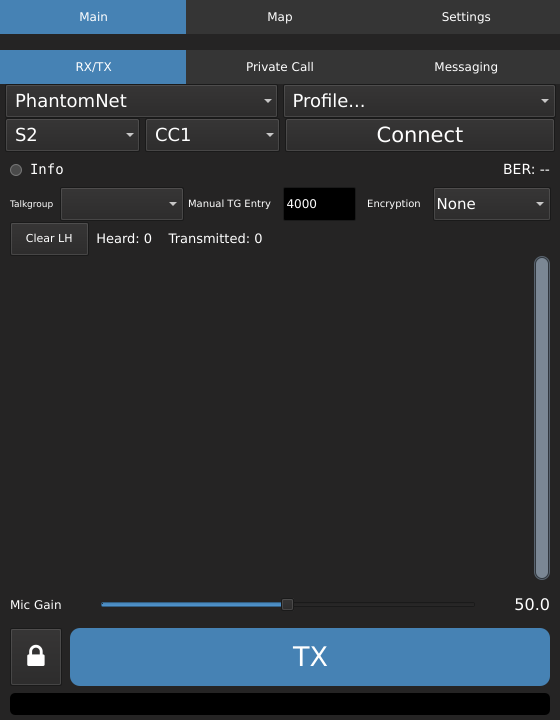
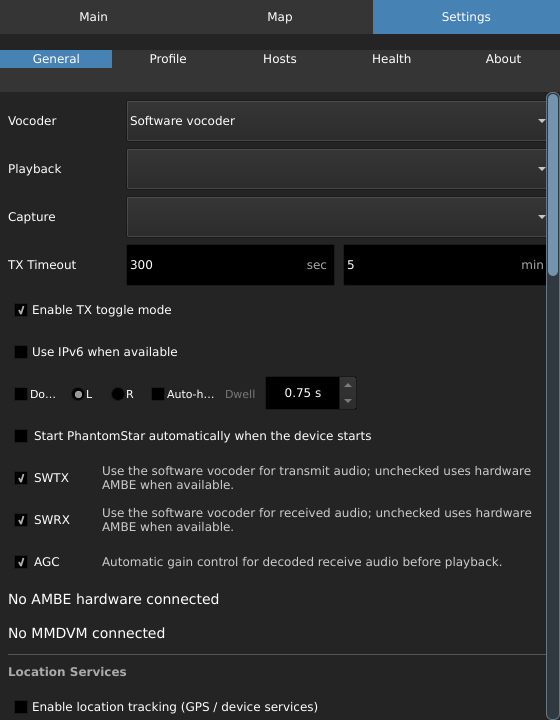
Silent recording of the Linux client. The clip adjusts microphone gain on the RX/TX console and opens General audio settings in a disconnected test session.
Screenshots
Overview
PhantomStar is the operator-facing DMR-over-IP application within PhantomNet. It connects to PhantomCore as an authenticated subscriber. The operator chooses a talkgroup and uses the client’s controls, while PhantomCore applies network access and routing policy.
Operator controls and status
The RX/TX screen shows the connection state, talkgroup and recent Last Heard activity, with push-to-talk and transmit-lock controls. Settings manages connection profiles, audio and other client preferences. The Android client can report location when the operator grants permission.
Platform and access options
Windows and Android are the primary native platforms. Linux builds also exist, and the iOS work is experimental. The separate PhantomWebClient project documents an experimental way to stream the Linux desktop application to a browser. A browser-native PhantomStar client remains an architecture proposal.
Development direction
The client roadmap tracks Windows and Android layout improvements, clearer connection messages and work on map behavior. The current client labels its private-call screen as reserved for future functionality.